Mastering Small Nozzle Printing in Cura
Cura Slicer Small Nozzle Printing: Tips for 0.2mm and 0.15mm Nozzles
Estimated reading time: 8 minutes
- Understand the implications of small nozzle sizes in 3D printing.
- Adjust key Cura settings for optimal print quality.
- Learn calibration techniques for fine-nozzle printing.
- Explore recommended filament options for detailed prints.
- Review examples of successful prints using small nozzles.
Table of Contents
- The Importance of Nozzle Size in 3D Printing
- Best Practices for Cura Slicer Settings with Small Nozzles
- Calibration Steps for Small Nozzle Printing
- Recommended Filament Choices for Fine Printing
- Print Examples and Micro-Detail Models
- Conclusion: Achieving Success with Small Nozzles in Cura
The Importance of Nozzle Size in 3D Printing
Before diving into the optimal settings for small nozzles, it’s essential to understand their impact on the printing process. Smaller nozzles allow for finer resolutions, creating more detailed prints with a thinner extrusion width. This capability is especially advantageous for intricate designs or models that are rich in detail. However, it comes with its challenges, including slower print speeds, the need for careful calibration, and adjustments to the flow rate.
Benefits of Using Small Nozzles
- Enhanced Detail: Achieve intricate designs with a resolution that standard nozzles cannot replicate.
- Better Layer Adhesion: Finer layers can improve the bond between layers, reducing print failures.
- Unique Textures: Smaller nozzles can create varied surface finishes not possible with larger nozzles.
Challenges Associated with Fine Nozzles
- Extended Print Times: Smaller diameters necessitate longer print durations.
- Increased Clogging Risk: Fine nozzles can easily become clogged with improper filament settings.
- Calibration Details: More critical calibration is needed to achieve optimal results.
Best Practices for Cura Slicer Settings with Small Nozzles
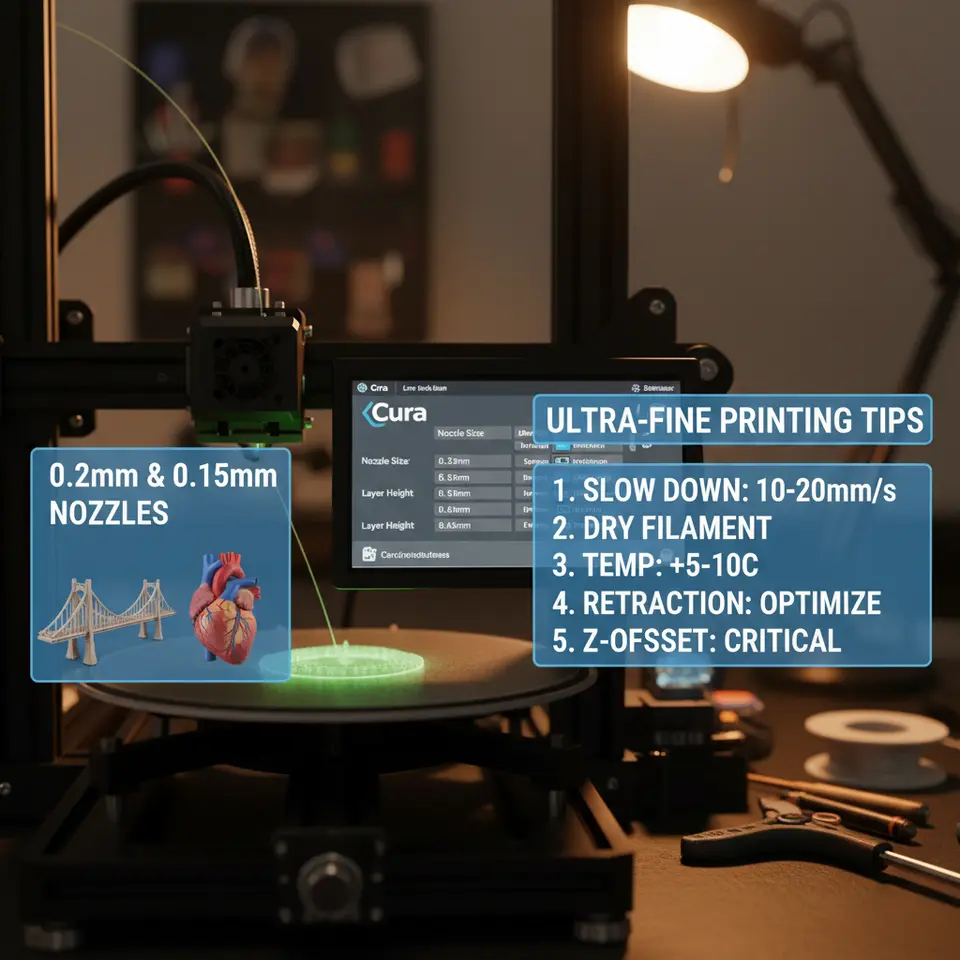
When using 0.2mm and 0.15mm nozzles, adjustments in several Cura settings are crucial. Below are essential tips to help ensure successful prints.
1. Print Speed Adjustments
Slower speeds are integral to achieving quality prints with smaller nozzles:
- Recommended Speeds: 15 – 25 mm/s for 0.2mm and 10 – 20 mm/s for 0.15mm nozzles.
- Why Slower Speeds?: Slower speeds allow the filament to cool and solidify, reducing the risk of stringing or oozing noticed at higher speeds.
2. Layer Height Optimization
Layer height is directly related to detail:
- Suggestions: Set layer heights to 0.1mm or lower for enhanced detail.
- Advantages: Thinner layers can further improve surface quality while reducing the visibility of layer lines.
3. Flow Rate Adjustments
Adjusting the flow rate ensures that your printer extrudes the correct amounts of filament:
- Calibration: Start with 100% flow, then adjust based on test prints. As a baseline, consider incrementally adjusting to 90–95% if over-extrusion is evident.
4. Temperature Settings
Temperature can greatly affect filament flow through small nozzles:
- Suggestions: Generally, use a temperature range of 190-220°C for PLA filaments; modify based on specific filament brands.
- Calibration: Conduct a temperature tower test to find the optimal temperature that minimizes stringing while ensuring good layer adhesion.
5. Bridging Limitations
Understanding the limits of bridging is critical for successful prints with small nozzles:
- Bridging Settings: Experiment with cooling settings and fan speeds (100% cooling fan is common for PLA) to improve bridging results.
- Testing: Create small bridge test models to judge the performance of your settings.
Calibration Steps for Small Nozzle Printing
Calibration is vital for successful fine-nozzle printing. Here’s how to calibrate your printer for small nozzles effectively:
- Initial Setup: Check that your nozzle temperature and print speed are set correctly.
- Filament Load Test: Run a test to ensure the filament flows well through the nozzle without clogs or jams.
- Extrusion Multiplier Test: Adjust the extrusion multiplier based on your filament’s actual output.
- Print Test Models: Use a micro-detail model (like a small intricately designed figurine) to evaluate your settings.
- Adjust and Repeat: Tweak settings based on print quality, looping back to modify filament types, speeds, or temperatures as needed.
Recommended Filament Choices for Fine Printing
Choosing the right filament plays a crucial role in achieving optimal results with small nozzles. Here’s a breakdown of some suitable options:
- PLA: A user-friendly filament known for its ease of use and fine detail capabilities when printing at lower speeds.
- PETG: Offers strong adhesion and flexibility, retaining detail while being less prone to warping.
- TPU: For flexible parts, small nozzles can create intricate designs, although testing is essential for compatibility.
For more tips on optimizing prints with specific filament types, check out our guide on Cura Settings for PETG, PLA, and ABS.
Print Examples and Micro-Detail Models
To understand the capabilities of small nozzles effectively, let’s look at some examples:
Example 1: Intricate Mini-figurines
These require maximum detail and can showcase the nozzle’s ability to print fine textures without loss of fidelity. A well-calibrated 0.15mm nozzle can create stunning character models.
Example 2: Articulated Designs
Articulated models require precision for moving parts to function correctly, making them a perfect candidate for small nozzles.
Example 3: Architectural Details
Printing detailed architectural models at 0.2mm is ideal for showcasing intricate designs like window frames and decorative elements.
Conclusion: Achieving Success with Small Nozzles in Cura
In summary, utilizing 0.2mm and 0.15mm nozzles within Cura slicer presents a realm of possibilities for creating highly detailed 3D prints. By implementing best practices such as adjusting print speed, layer height, flow rate, and ensuring thorough calibration, you can achieve high-quality results that will impress both hobbyists and professionals alike.
For a deeper understanding of Cura’s capabilities and to enhance your printing projects, you can read our guide on Perfecting Your First Layer in Cura. Additionally, explore our homepage at CuraSlicers.com for comprehensive 3D printing tips.
FAQ Section
What is the benefit of using a small nozzle?
Using small nozzles allows for finer detail in prints and enhanced resolution, making them ideal for intricate designs.
How long does it take to print with a small nozzle?
Print times may be extended due to the slower speeds required for small nozzles, making print durations longer than with standard nozzles.
What filament types are best for small nozzles?
PLA, PETG, and TPU are suitable filaments that yield good results when printed through small nozzles.