Create Effective Tree Supports in Cura
How to Create Printable Supports Inside Hollow Parts Using Cura’s Tree Support Strategies
Estimated Reading Time: 5 minutes
- Understand the advantages of tree supports for complex geometries.
- Learn how to use and adjust tree supports settings in Cura for optimal results.
- Master support removal techniques for preserving print quality.
- Evaluate the benefits and costs of implementing tree supports.
Table of Contents
- Understanding Tree Supports in Cura
- When to Use Tree Supports
- Advantages of Tree Supports
- Getting Started with Tree Supports in Cura
- Best Practices for Support Removal
- Post-Support Finishing
- The Cost/Benefit Analysis of Tree Supports
- Conclusion
- FAQ
Understanding Tree Supports in Cura
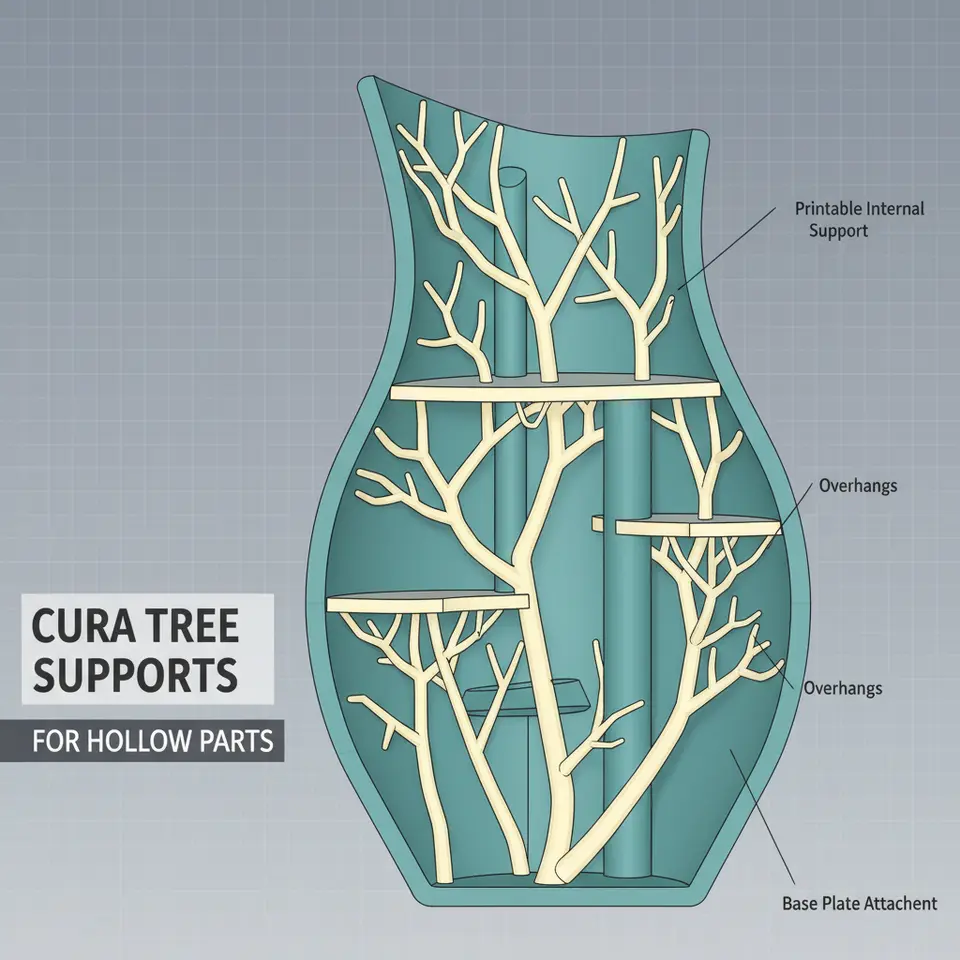
Tree supports are a unique support structure that mimics the natural growth of trees. Instead of standard linear supports, tree supports use a fractal-like structure that reduces material usage and can improve the ease of removal. This design is especially beneficial for hollow parts, where traditional supports might not conform optimally to the internal contours of your object.
When to Use Tree Supports
Tree supports are particularly useful in the following scenarios:
- Complex Geometries: When printing intricate models with overhangs that require support in hard-to-reach areas.
- Hollow Models: When your model has hollow sections where traditional supports may not fit appropriately.
- Fragile Features: They are ideal for supporting delicate structures that could break under standard support systems.
Advantages of Tree Supports
- Material Efficiency: Uses less filament compared to linear supports, making it cost-effective.
- Better Accessibility: Their branched structure allows for easier access to the part once the print is completed.
- Reduced Contact: The minimalistic design reduces the contact area with the print, making removal simpler and less damaging to your model.
Getting Started with Tree Supports in Cura
To create tree supports in Cura, follow these steps:
1. Import Your Model
Begin by importing your 3D model into Ultimaker Cura. Be sure that it is properly scaled and oriented for printing.
2. Activate Tree Supports
- Go to the Support settings in Cura.
- Select Support Structure and then choose Tree Support. This option will replace traditional supports with the tree structure.
3. Adjust Branch Density
Tree supports in Cura offer several adjustable parameters, including branch density, which determines how dense the tree branches will be.
- Branch Density: Adjust this setting based on your model’s requirements. A high density will provide more support but could increase material usage and make removal more challenging. For fragile overhangs, a lower density is often preferable.
It’s important to find a balance: Lower density often works well for large prints with fewer leaf branches, while higher density is effective for small, delicate areas.
4. Configure Other Support Settings
- Support Z Distance: This setting adjusts the space between the model and support structure. Increase this value for easier removal of supports.
- Support X/Y Distance: Similar to Z distance, this setting helps create space horizontally between the print and supports.
Recommended Settings for Fragile Overhangs
- Reduced Density: Start with a density of around 5-10% for fragile models.
- Increase Z Distance: Set this to around 2.0 mm to make support removal less intrusive.
- Limit the Overhang Angle: Adjust the overhang angle to 60 degrees or higher to minimize the amount of support required.
Best Practices for Support Removal
After printing, removing tree supports can be tricky but manageable with these tips:
- Gentle Pulling: Use a gentle twisting motion to dislodge the support branches from the model.
- Use Cutting Tools: For stubborn areas, use precision cutting tools to carefully slice through supports without damaging the model.
- Heat Influence: Applying mild heat from a heat gun can soften the filament slightly, making removal easier.
Post-Support Finishing
Once your supports are removed, you may want to refine the surface of your printed model:
- Sanding: Lightly sand any areas where supports were attached to smooth over any rough patches.
- Chemical Smoothing: Depending on the filament used, consider chemical smoothing methods for a cleaner finish, particularly on ABS or ASA prints.
The Cost/Benefit Analysis of Tree Supports
Before deciding on tree supports, consider the trade-offs:
Benefits
- Less Material Use: Excellent for reducing filament costs, as less material is used for supports.
- Easier Removal: Allows for accessible support structures and cleaner finishes.
Costs
- Longer Print Times: More complex designs can sometimes increase print times slightly due to the nature of the support structure.
- Variable Strength: For extremely delicate parts, the tree support might not provide adequate strength if not configured properly.
Conclusion
Understanding how to create printable supports inside hollow parts using Cura’s tree support strategies can radically enhance your 3D printing experience, providing better quality prints and lowering material waste. With the right settings tailored to your model’s needs, you’ll be able to tackle complex geometries with confidence.
For a deeper dive into Optimizing Other Cura Settings, check out our guide to enhance your prints further. If you’re curious about support configurations, our article on Cura Support Settings can provide additional insights.
Don’t forget to subscribe to our newsletter for more tips on improving your 3D printing projects! For more guides, tips, and tricks, explore our resources at CuraSlicers.com.
For official support and detailed specifications on Ultimaker Cura, you can always refer to Ultimaker’s documentation for authoritative insights.
With the right knowledge and tools, your journey through 3D printing will be as fulfilling as it is creative. Happy printing!
FAQ
What are tree supports?
Tree supports are a type of support structure in 3D printing that have a branched design, mimicking the natural growth of trees, designed to improve material efficiency and ease of removal.
When should I use tree supports instead of traditional supports?
Use tree supports for complex geometries, hollow models, or fragile features where traditional supports may not fit properly or could damage the model.
How do I remove tree supports?
Remove tree supports gently by twisting to dislodge them, use precision cutting tools for stubborn areas, or apply mild heat to soften the filament for easier removal.