How Nozzle Geometry Influences Cura Line Width
Estimated Reading Time: 7 minutes
Key Takeaways:
- Nozzle geometry significantly impacts extrusion accuracy and print quality.
- Understanding line width settings in Cura is essential for optimal print results.
- Regular maintenance of nozzles can greatly enhance print quality.
- Different nozzle types can yield varied results based on specific print applications.
Table of Contents
- The Basics of Nozzle Geometry
- How Cura Calculates Line Width
- The Impact of Nozzle Shape on Print Quality
- Practical Considerations When Printing
- Conclusion
- FAQ
The Basics of Nozzle Geometry
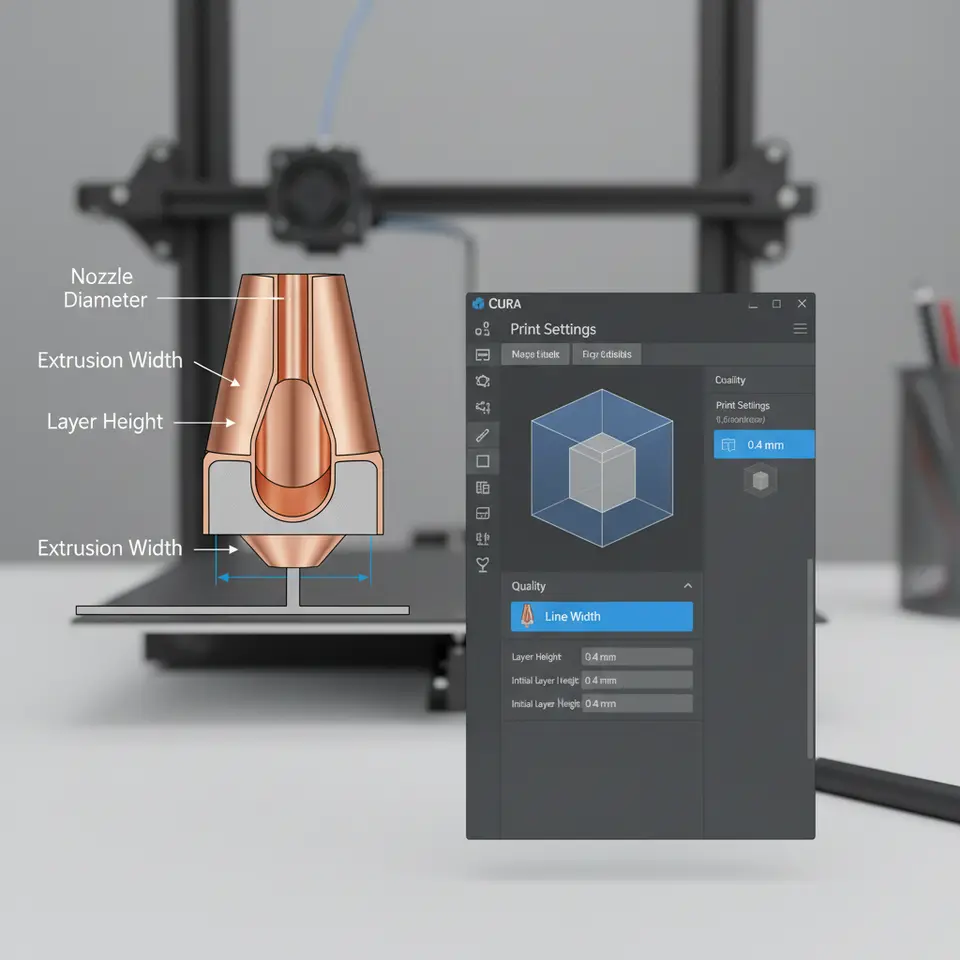
To comprehend how nozzle geometry affects line width calculations, it’s essential to start with an understanding of nozzle design. A standard 3D printer nozzle is typically shaped like a truncated cone, with the tip acting as the exit point for the filament. The nozzle diameter is the most commonly discussed parameter, but other geometric factors such as the internal shape and the angle of the taper play a substantial role in influencing filament flow and, subsequently, the quality of your prints.
- Cross-Sectional Area: Nozzle shape affects the cross-sectional area through which filament exits. Wider nozzles can deposit more filament, which may widen the extruded line width, but it also depends on how filament flows through the nozzle. If the nozzle’s interior is too constricted or has poor design, it can lead to inconsistencies in flow, regardless of the diameter.
- Wear and Tear: Over time, nozzles can become worn out, leading to shape distortion. This can affect the extrusion characteristics, resulting in inconsistent filament flow rates. A worn nozzle might produce irregular line widths on prints, which traditional diameter-based calculations won’t account for. Regular maintenance and replacement of nozzles are essential for maintaining print quality.
How Cura Calculates Line Width
Cura’s calculations for line width are integral to ensuring that the appropriate amount of filament is extruded during a print job. The settings in Cura allow users to select line width based on the nozzle size, but they can also be adjusted for specific printing requirements.
- Setting Line Width: In Cura, line width is usually set between 100% to 120% of the nozzle diameter. For instance, if you are using a 0.4mm nozzle, a line width of 0.4mm to 0.48mm might be recommended. This ensures optimal adhesion and sufficient coverage for most prints.
- Modification for Geometry: When users modify line width settings, they should consider the geometry of their nozzle. If they are using a nozzle with a tapered design, slight adjustments to the line width can help achieve better adherence and layer bonding. Understanding the relation between nozzle geometry and line width can help improve overall print outcomes.
- Flow Rate Adjustments: Users can also modify the flow rate in Cura to compensate for geometry-related issues. If a nozzle’s interior becomes malformed, increasing the flow rate can help ensure that enough filament is extruded to maintain the desired line width. However, this approach must be used judiciously to avoid over-extrusion.
The Impact of Nozzle Shape on Print Quality
As you consider how nozzle geometry affects line width calculations, it’s also vital to explore how these geometrical variations impact overall print quality.
- Print Resolution: A nozzle with greater geometric precision typically allows for improved print resolution. Shapes that are optimized for fluid dynamics can produce more consistent lines at the extruder tip, which translates to higher-quality prints.
- Surface Finish: The way filament is deposited directly influences the surface finish of 3D printed parts. A well-designed nozzle will minimize issues like stringing and blobbing by enabling more controlled filament flow, allowing users to achieve smoother finishes, especially evident in cosmetic prints. For tips on optimizing Cura for small cosmetic prints, check out our optimize cosmetic prints guide.
- Layer Adhesion: Proper line width calculations, which take into account nozzle geometry, can lead to better layer adhesion. If lines are printed too narrow due to incorrect calculations, the overall part may suffer from weaker bonds between layers, compromising structural integrity.
Practical Considerations When Printing
For those working with different nozzle geometries, there are several practical takeaways to enhance printing performance:
- Test Different Nozzle Types: Experimenting with various nozzle shapes and designs can yield better results. For example, some users prefer conically shaped nozzles for specific print applications, while others find exceptional results with flat-tipped nozzles.
- Regular Maintenance: Regularly inspect and replace nozzles, especially those that show signs of wear. Cleaning nozzles before every printing session can also prevent filament clogs, which would alter the expected line width and adversely affect print quality.
- Adjust Line Width Settings: Utilize Cura’s advanced settings to alter line width based on the anticipated filament flow/behavior through a specific nozzle. Fine-tuning these parameters according to the nozzle’s condition and geometry can dramatically enhance print outcomes.
Conclusion
Understanding how nozzle geometry affects Cura line width calculations is key to improving your 3D printing results. By recognizing the relationship between nozzle design and extrusion accuracy, you can make informed decisions that lead to more consistent prints and better print quality overall. Whether you’re a hobbyist looking to refine your craft or a professional aiming for perfection, paying attention to these details will undoubtedly pay off.
For further enhancement of your 3D printing workflow, explore our Cura Slicer Workflow Guide for more tips and tricks. If you find these insights useful, don’t hesitate to check out our main page for more resources and to stay updated with the latest trends in 3D printing!
For a more in-depth understanding of nozzle wear and its impact on print quality, you can refer to Ultimaker’s guide on nozzles.
FAQ
What is the ideal line width setting in Cura?
In Cura, line width is generally set between 100% and 120% of the nozzle diameter to ensure optimal print quality and adhesion.
In Cura, line width is generally set between 100% and 120% of the nozzle diameter to ensure optimal print quality and adhesion.
How does nozzle shape influence print quality?
Nozzle shape affects the flow of filament, impacting print resolution, surface finish, and layer adhesion, all of which determine the quality of the printed part.
Nozzle shape affects the flow of filament, impacting print resolution, surface finish, and layer adhesion, all of which determine the quality of the printed part.
Why is regular maintenance of nozzles important?
Regular maintenance of nozzles prevents wear and clogs that can lead to issues in extrusion consistency and print quality.
Regular maintenance of nozzles prevents wear and clogs that can lead to issues in extrusion consistency and print quality.