Differences Between Soft TPU and Rigid TPU
Estimated Reading Time: 5 minutes
Key Takeaways:
- Understanding Shore hardness is key to optimizing 3D printing with TPU.
- Soft TPU necessitates slower print speeds and adjusted retraction settings.
- Rigid TPU offers better bridging and greater structural integrity.
- Profiling settings in Cura for different TPU types can enhance print quality.
- Consult expert resources for advanced printing strategies.
Table of Contents
Shore Hardness Explained
Shore hardness is assigned based on various scales, of which Shore A and Shore D are most prominent in 3D printing. Shore A is typically used for softer materials, whereas Shore D is reserved for harder materials. TPU can vary widely across these scales, from soft, flexible components to more rigid constructions.
- Soft TPU: Usually falls between Shore A 70 to 85. This grade is highly flexible, making it ideal for applications that require bendability, shock absorption, and a snug fit.
- Rigid TPU: Typically falls between Shore A 95 to 100 or even into Shore D. It retains some flexibility, but it has enhanced strength and durability suitable for structural applications.
How Shore Hardness Affects 3D Printing
1. Print Speed:
When printing softer TPU, the nozzle speed and flow rate settings will need to be adjusted accordingly. Softer materials require slower speeds to ensure that the filament has enough time to extrude and bond properly. On the other hand, printing with rigid TPU allows for faster extrusion speeds since the material is less prone to deformation and can be pushed through the nozzle more quickly.
When printing softer TPU, the nozzle speed and flow rate settings will need to be adjusted accordingly. Softer materials require slower speeds to ensure that the filament has enough time to extrude and bond properly. On the other hand, printing with rigid TPU allows for faster extrusion speeds since the material is less prone to deformation and can be pushed through the nozzle more quickly.
2. Retraction Settings:
Retraction is a critical factor in preventing stringing and ensuring clean prints. Soft TPU tends to be more prone to stringing due to its flexible nature, demanding more careful retraction settings:
Retraction is a critical factor in preventing stringing and ensuring clean prints. Soft TPU tends to be more prone to stringing due to its flexible nature, demanding more careful retraction settings:
- Soft TPU: Lower retraction speeds (around 20–30 mm/s) and retraction distances (2–4 mm) can help minimize stringing.
- Rigid TPU: You can afford to set higher retraction speeds (40–60 mm/s) and distances since the material doesn’t deform as much during travel.
3. Bridging Capability:
Bridging refers to how effectively a material can span gaps during printing. Soft TPU has difficulty with bridging due to its flexibility, which can cause sagging and inconsistencies in the print.
Bridging refers to how effectively a material can span gaps during printing. Soft TPU has difficulty with bridging due to its flexibility, which can cause sagging and inconsistencies in the print.
Conversely, rigid TPU can be utilized for bridging applications since it maintains its shape better. In Cura, adjusting settings like bridge speed and adjusting the cooling settings helps improvements in print quality when dealing with bridged sections.
4. Reliability and Layer Adhesion:
Layer adhesion varies significantly between soft and rigid TPUs. Soft TPUs bond well due to their viscous nature but may struggle with vertical strength since they tend to flex under load. Rigid TPUs offer better compression strength making them more reliable for structural applications.
Layer adhesion varies significantly between soft and rigid TPUs. Soft TPUs bond well due to their viscous nature but may struggle with vertical strength since they tend to flex under load. Rigid TPUs offer better compression strength making them more reliable for structural applications.
When defining your Cura profiles, you must factor in the cooling and temperature settings to ensure optimal layer adhesion. Higher print temperatures can enhance adhesion for softer TPUs, but they can also lead to warping in rigid grades if not monitored closely.
Practical Tips for Cura Settings
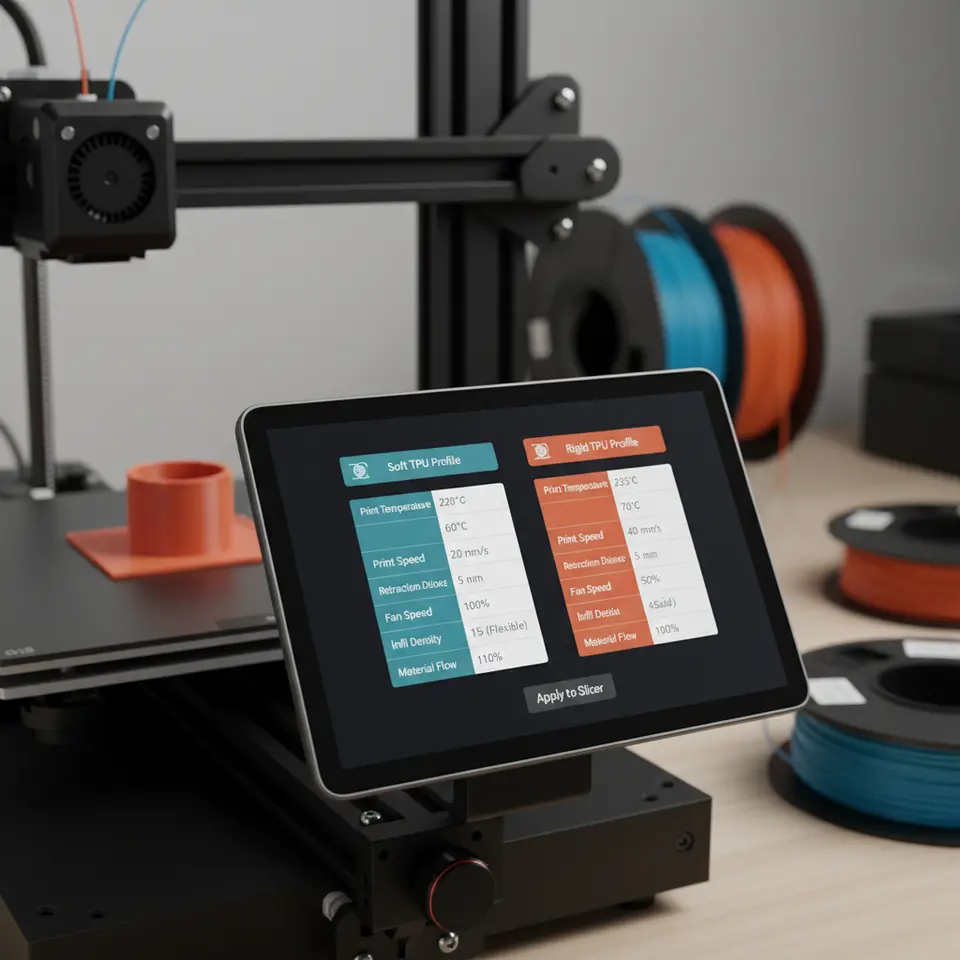
Soft TPU Profile:
- Layer Height: 0.1 – 0.2 mm for finer detail.
- Print Speed: Start at 30 mm/s and adjust as needed.
- Retraction Speed: 20-30 mm/s; Retraction Distance: 2-4 mm.
- Nozzle Temperature: 220-240 °C.
- Cooling: Enable cooling for better bridging and detail.
- Flow Rate: 95-100% for better material flow.
Rigid TPU Profile:
- Layer Height: 0.1 – 0.3 mm for structural reliability.
- Print Speed: 50-70 mm/s.
- Retraction Speed: 40-60 mm/s; Retraction Distance: 4-6 mm.
- Nozzle Temperature: 210-230 °C.
- Cooling: Less cooling to prevent warping during prints.
- Flow Rate: 100% should suffice.
Conclusion
Knowing the key differences in printing soft TPU vs. rigid TPU can transform your 3D printing experience. By adjusting your Cura profiles based on the Shore hardness of the material, you can significantly improve your print quality and reliability. These insights also reflect how material attributes can greatly affect not just quality, but speed and efficiency across your entire workflow.
For more detailed insights into optimizing your prints, be sure to check out our Cura Slicer Support Settings for Overhangs and Long Print Reliability Settings guides.
Call to Action:
Don’t hesitate to further explore our wealth of resources at CuraSlicers.com for more tips, tricks, and guides on 3D printing. Share your experiences and connect with fellow enthusiasts by following us on our social media or subscribing for the latest updates and articles!
Don’t hesitate to further explore our wealth of resources at CuraSlicers.com for more tips, tricks, and guides on 3D printing. Share your experiences and connect with fellow enthusiasts by following us on our social media or subscribing for the latest updates and articles!
For more information on printing settings and Cura functionalities, check the Ultimaker official documentation for a comprehensive understanding of material behavior in different profiles.